Chainlit Client
The included Chainlit UI is an optional OpenAI client of LGOS. It does not add routes or change the server contract.
The Chainlit project intentionally does not install or import the
langgraph-openai-serve Python package. It demonstrates that a UI integration
needs only the OpenAI wire contract. Its local declarations cover only LGOS
model metadata and link to their authoritative source files.
Each server tool a profile advertises in lgos.server_tools becomes an opt-in
Chat Settings switch labelled from its name: server-tool gets
Package version and Web search, while deep-research gets only
Web search and receives gateway MCP tools separately through its advertised
capability. Chainlit includes only selected tools in the native Responses
tools array, and offers display_file only to profiles that list it in
lgos.client_tools. A custom tool uses a name-only declaration, while search
uses {"type":"web_search"}. LGOS completes selected server tools inside
the same Response, so Chainlit executes only returned function_call items.
deep-research pauses for plan review when a question needs research, not
through a UI setting.
Native URL-citation annotations become
clickable Chainlit source elements containing Markdown links, without changing
the replayed answer text.
Select one first-class gateway
Set OPENAI_GATEWAY_TYPE=litellm|bifrost once for both demo UIs. LiteLLM
uses managed Responses; Bifrost uses native Responses. Files also use the
selected gateway's normal route. Metadata comes from LiteLLM's native
/model/info or Bifrost's native /v1/models attributes. Chainlit
never connects directly to the LGOS or Files containers and remains
Responses-only.
Run The UI
Create the local environment file and a Chainlit signing secret:
cp demo/.env.example demo/.env
uv run --directory demo/ui/chainlit_ui --locked chainlit create-secret
Put the generated value in CHAINLIT_AUTH_SECRET. Configure Chainlit's native
element storage with BUCKET_NAME, APP_AWS_*, and DEV_AWS_ENDPOINT.
Separately configure the central Files API with DEMO_API_FILES_BUCKET,
DEMO_API_FILES_S3_ENDPOINT, and DEMO_API_FILES_AWS_*. Replace every example
value before starting the UI; neither service reads the other's S3 settings.
Start the complete stack, including the gateway selected by COMPOSE_PROFILES:
It syncs model metadata into the gateway after Chainlit starts, so open
http://localhost:3002 once the command completes.
With an external gateway, just demo/up lgos-chainlit starts only
Chainlit and PostgreSQL.
Start the selected gateway first:
Both gateways use host port 3000. Then start the MCP reports, which also start the demo API and the Chainlit container on port 3002 they depend on:
Run the local UI on another port:
Open http://localhost:5000.
Both modes apply pending Chainlit schema migrations when the UI starts. See Docker Compose for container endpoints.
When starting components independently, sync model metadata before using the
UI: model sync for LiteLLM or just demo/sync-bifrost for
Bifrost. The full-stack Compose targets do this automatically.
Profile discovery and settings read GET /model/info with the current gateway
credential. Entries with model_info.lgos become profiles; model_name is
sent unchanged to managed /v1/responses. There are no provider allowlists,
implicit prefixes, or per-provider catalog URLs.
With Bifrost selected, native /v1/models supplies provider-qualified IDs and
the full extension as a JSON string in additional_attributes.lgos.
Catalog sync publishes that metadata
automatically during startup. Inference sends the catalog ID unchanged to
native /openai/v1/responses. The demo API owns the descriptions and capabilities.
Chainlit keeps the Responses model usable for plain text but marks it as
Limited functionality when an endpoint omits or strips them.
LiteLLM's managed /v1/models response contains only the standard model
fields, so it is not the UI catalog. The full model_info.lgos extension
supplies descriptions, features, and client-settings schemas in one response.
Selecting a profile rereads the selected gateway's native catalog so settings
use current metadata and model permissions. Errors do not trigger a fallback to LGOS.
The gateway selector owns routing; users explicitly configure its type and root URL. Browser login and gateway authorization are separate settings: mock and OAuth login can use a static key, while OAuth can optionally delegate the signed-in user's access token.
Gateway MCP
The backend derives one trusted /mcp connection from the selected gateway
root. The browser receives no URL or bearer token, and user-provided servers
remain disabled. After you click Connect, Chainlit owns the session and
discovers the tools authorized by the gateway. It sends them only when the
selected model advertises the mcp_tools capability. Every MCP request carries
the same credential as Responses and Files, resolved at that moment:
OPENAI_GATEWAY_API_KEY, or the signed-in user's refreshed access token in
delegated mode. mcp-postgres applies a fixed report allowlist at the
API boundary, while general-purpose graphs can use the gateway-authorized tool
catalog without knowing which MCP servers provide it.
The current database example is PostgreSQL Through Native MCP; see it for the complete request flow, read-only controls, and connection steps. Chainlit's official MCP guide documents the underlying lifecycle.
File Attachments
The UI uploads every file attached to the current user message through
client.files.create(..., purpose="user_data"). It then replaces the attachment
with a native Responses input_file part containing the returned file_id.
Files requests use the selected gateway's normal /v1 route. Bifrost assigns
them to its fixed lgos-files provider, while LiteLLM assigns them to its
configured litellm_proxy Files provider. Responses continue to use the
selected model provider. The demo therefore has one file namespace shared by
both inference providers.
The attachment button appears only for profiles that advertise file_inputs
and accepts up to five files of 10 MiB each per message. Select
lgos/file-input to process an attachment with the
dedicated demo graph.
If an OpenAI API caller sends a native file part to a
general graph such as simple-graph, LGOS preserves it, but that graph does not
resolve its central ID.
Chainlit upload validation
Chainlit applies profile overrides to the browser and WebSocket session,
but its /project/file validator
reads the global setting. The demo therefore leaves that route globally
enabled, hides the attachment control through native
ChatProfile.config_overrides,
and checks the effective session profile before uploading to the central
Files API. Remove this workaround once Chainlit's upload route validates
against the effective session configuration.
Chainlit's native S3 persistence remains responsible for restoring UI elements.
The OpenAI Files upload is the separate inference contract; the adapter does
not wait for a Chainlit persistence URL or put one in file_data. See
Accept And Display Files.
Voice
Chainlit's native microphone button streams raw audio to the app; Chainlit has
no speech-to-text or text-to-speech of its own. The app shows the microphone
only when DEMO_AUDIO_STT_MODEL is set and adds a Read aloud button under
each completed answer only when DEMO_AUDIO_TTS_MODEL is set. Both features
come from chainlit-utils; the app supplies the gateway client, models, and
voice.
The microphone dictates like Open WebUI's:
- Click the microphone or press
P, speak, then stop the recording. Chainlit does not stop on silence. - The app wraps the recording in a WAV file and sends it to the selected
gateway's
/v1/audio/transcriptionsroute. - The transcript appears in the chat input. Edit it and press Enter to send it like a typed message.
Chainlit has no API for its chat input. The app therefore sends the
transcript with cl.send_window_message, and chainlit-utils'
dictation.js,
loaded through the native custom_js setting, writes it into the
#chat-input textarea. Recheck that script after Chainlit upgrades.
Read aloud also works like Open WebUI's:
- The button is the
chainlit-utilsSpeechButtoncustom element, built from Chainlit's own button and tooltip components. It sends only the answer's message ID and a sentence number throughcallAction, so the browser cannot request arbitrary speech. - The backend removes emojis and Markdown formatting, splits the answer into
sentences with Open WebUI's rules, and sends one sentence to
/v1/audio/speech. The browser plays the sentences in order, so playback starts after the first one and long answers stay under the speech input limit. Neither gateway streams speech as a normal audio response: LiteLLM returns the finished clip, and Bifrost streams onlystream_format: "sse"events. - Speech is synthesized only when the button is clicked. Replays reuse the sentences already fetched on that page.
Speech uses the same gateway credential as Responses, including a delegated
OAuth token, and LGOS receives and returns only text. See
Stack Settings for the speech settings. Chainlit
names a thread that starts with a recording audio, even when the dictated
text is discarded.
Runtime Settings
After a profile is selected, Chainlit:
- Reads the selected model's gateway metadata through the OpenAI client and uses
lgos.client_settings. - Renders supported JSON Schema properties as Chainlit Chat Settings.
- Restores saved values that still match the supported widget type or choice.
- Compares the selected values with the advertised defaults.
- Sends changed values as JSON text in
metadata.lgos_settingson every Responses request.
Booleans become switches, inline string enums become selects, strings become
text inputs, and integers become sliders when they declare both minimum and
maximum, or number inputs otherwise. Other schema shapes are not rendered.
Chainlit stores number widget values as floats, so whole numbers are sent as
integers. The adapter checks only these types, integer bounds, and select
membership when restoring the UI; it does not interpret general JSON Schema
constraints. LGOS remains the validation authority. If the required LGOS
model extension is unavailable, Chainlit hides the controls, uses server
defaults, keeps the thread's saved selections for when the metadata returns,
and shows a transient Limited functionality warning after selection. Profile discovery itself stays
list-only because descriptions and features arrive with the list response.
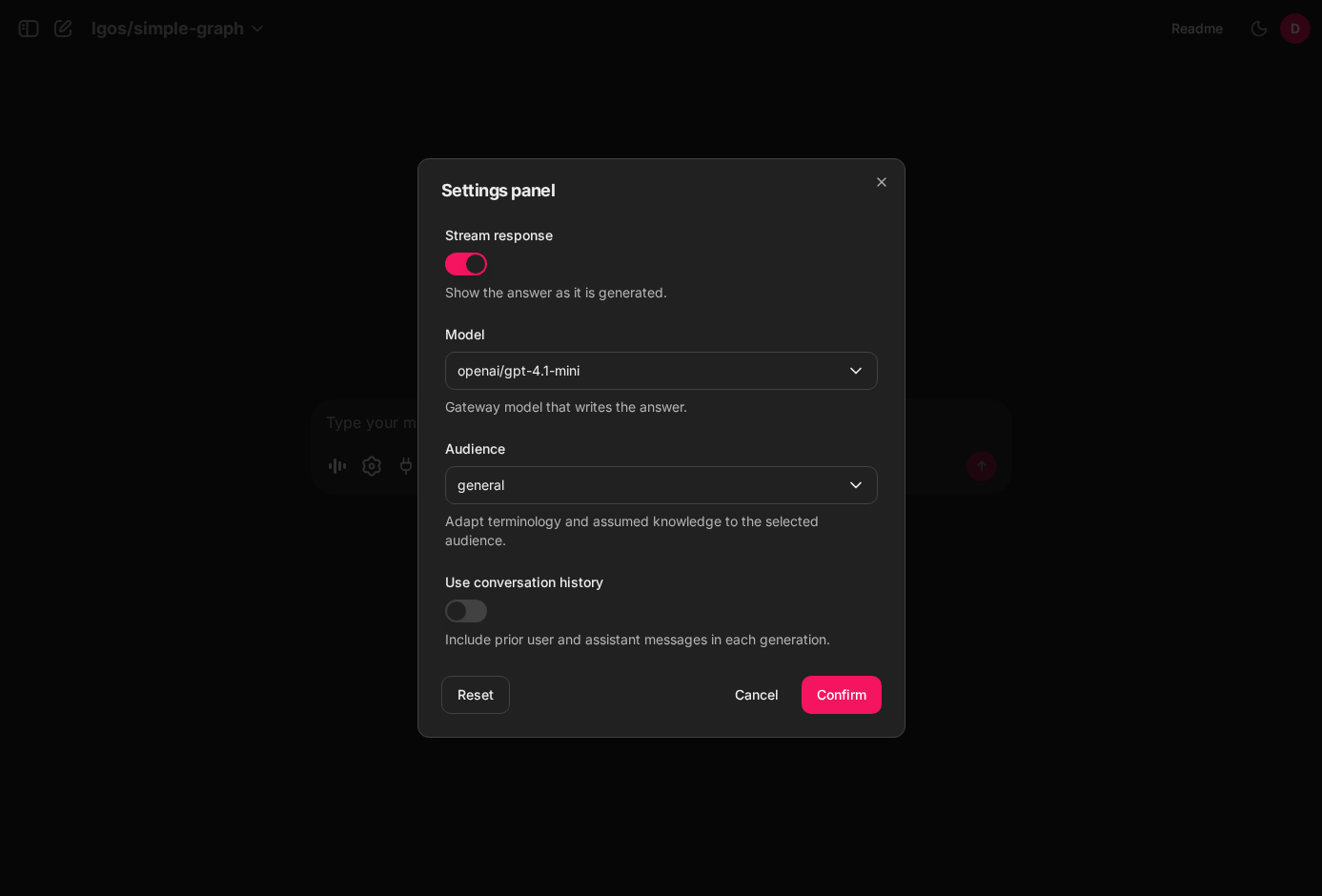
Runtime settings discovered from lgos/simple-graph and rendered as native
Chainlit controls.
The same panel includes a Chainlit-owned Stream response switch for every
profile. It defaults to enabled and selects responses.stream or
responses.create; it is not included in lgos_settings. With
streaming disabled, Chainlit waits for the complete response and sends the
answer once. The switch also applies to the answer that follows a human
review.
Models advertising background also receive an opt-in Run in
background switch. Chainlit uses non-streaming create/retrieve polling,
renders lifecycle states in its task list, and requests cancellation when the
turn stops. Interrupt answers follow the same switch. This client-owned switch
is not included in lgos_settings.
Chainlit may restore UI selections with a saved thread, but LGOS does not persist runtime settings. The adapter resends non-default values for every request that needs them. The underlying contract is documented in LangGraph Runtime Settings.
Persistence And Login
Reusable OIDC routes, request credential isolation, and encrypted token storage
come from chainlit-utils. Demo-specific settings and login policy are grouped
in demo/ui/chainlit_ui/src/lgos_chainlit/auth.py, with wiring tests in
demo/ui/chainlit_ui/tests/test_auth.py. Reusable browser-flow and token-storage
tests live in chainlit-utils. See the
Chainlit project README
for the module layout, editable utility development, and targeted test commands,
and the chainlit-utils repository
for its reusable integration suite.
Chainlit's PostgreSQL data layer stores users, threads, steps, and feedback.
Opening a stored thread restores its transcript, with answered reviews as their
function calls and outputs, and continues with the same login identity. The
adapter also sends Chainlit's stable thread ID as
metadata.conversation_id on every Responses request, allowing Langfuse to group the
thread's per-request traces into one session. The persistent-plot-agent demo also
combines that value with the authenticated safety_identifier to scope its LangGraph
chart document. The transcript remains owned and resent by Chainlit; no chat
history is added to LGOS. See the
persistent plot agent ownership flow
for the API Store, Chainlit PostgreSQL, and S3 boundaries.
| Browser login | OAuth token forwarding | Gateway credential |
|---|---|---|
mock |
false |
OPENAI_GATEWAY_API_KEY |
oauth |
false |
OPENAI_GATEWAY_API_KEY |
oauth |
true |
Signed-in user's OAuth access token |
The demo's chainlit.yml sets the first row. just demo/compose --sso adds
the SSO overlay, which sets the last row. Outside
Compose, such as with just demo/chainlit, Chainlit reads
DEMO_CHAINLIT_LOGIN_TYPE and DEMO_CHAINLIT_ENABLE_OAUTH_TOKEN_FORWARDING
from its environment, which also allows the middle row.
Mock login maps every login to the shared demo-user and sends
OPENAI_GATEWAY_API_KEY to the gateway. This is for local use only.
OAuth uses Authlib's OIDC integration with S256 PKCE, state/nonce validation,
and verified ID tokens. The stable sub claim identifies users. Set the exact
HTTPS issuer for discovery and register
${CHAINLIT_URL}/auth/oauth/${OAUTH_GENERIC_NAME}/callback in your provider.
HTTPS is required for OAuth, including its secure cookies; use mock mode for
plain-HTTP local development.
Chainlit's native OAuth prompt settings
are honored. Set OAUTH_PROMPT globally, or use OAUTH_GENERIC_PROMPT when
OAUTH_GENERIC_NAME=generic to override it for that provider.
With just demo/compose --sso, Chainlit delegates gateway authorization
to the signed-in user. Set these values in demo/.env:
DEMO_SSO_ISSUER=https://id.example.com
CHAINLIT_URL=https://chat.example.com
DEMO_CHAINLIT_OAUTH_CLIENT_AUTH_METHOD=client_secret_basic
DEMO_CHAINLIT_OAUTH_ENCRYPTION_KEYS='["YOUR_GENERATED_FERNET_KEY"]'
OAUTH_GENERIC_CLIENT_ID=YOUR_CLIENT_ID
OAUTH_GENERIC_CLIENT_SECRET=YOUR_CLIENT_SECRET
OAUTH_GENERIC_NAME=generic
OAUTH_GENERIC_SCOPES="openid profile email groups offline_access llm:invoke"
The same overlay makes the bundled LiteLLM validate those tokens; see the SSO overlay.
Outside Compose, set DEMO_CHAINLIT_LOGIN_TYPE=oauth and
DEMO_CHAINLIT_ENABLE_OAUTH_TOKEN_FORWARDING=True yourself. With token
forwarding set to False, users sign in with SSO while Chainlit sends the
static key to the gateway and stores no provider tokens.
OAUTH_GENERIC_SCOPES is requested in either case, so for login only use
openid profile email groups; an unsupported gateway scope such as
llm:invoke can prevent sign-in.
Chainlit ignores the shared static key in delegated mode, which the SSO
overlay does not pass at all; MCP tools use the user's token too. The
gateway services keep using OPENAI_GATEWAY_API_KEY.
Match DEMO_CHAINLIT_OAUTH_CLIENT_AUTH_METHOD to the registered client:
client_secret_basic (default) or client_secret_post. Authlib uses it for
code exchange and, in delegated mode, refresh and revocation. Discovery must
advertise S256 PKCE and support the selected authentication method.
For delegated mode, request your gateway's permission (llm:invoke in
this example). The token's audience must identify the gateway API, not
merely the login client.
For providers using RFC 8707 resource indicators,
set DEMO_CHAINLIT_OAUTH_RESOURCE; Chainlit then includes it in authorization,
code exchange, and refresh requests. Otherwise leave it unset and configure
the audience using the provider's client/scopes settings.
For example, with PocketID set DEMO_CHAINLIT_OAUTH_RESOURCE=https://llm.example.com
to the exact resource identifier registered under its APIs, and grant the
client user-delegated llm:invoke access. With Keycloak, an audience mapper
and linked client scope can supply the audience and permission without resource.
PocketID is a deployment example, not a dependency of Chainlit's auth code.
With token forwarding enabled, Chainlit sends the access token as
Authorization: Bearer ....
The gateway must accept delegated tokens on Responses, Files, MCP, and
native GET /model/info. The demo's LiteLLM role_permissions grant SSO
users the native openai_routes, model_info_routes, and
mcp_inference_routes route groups; no LGOS-specific path allowlist is
needed. The UI uses the list endpoint, which applies LiteLLM's caller model
permissions, and selects the model locally.
In delegated mode, Chainlit keeps credentials encrypted in
lgos_chainlit_oauth_sessions, created at startup. Each login has a distinct
credential record and an opaque session ID in Chainlit's signed cookie;
access/refresh tokens never enter that cookie, user metadata, or chat history.
Sessions expire after Chainlit's configured user_session_timeout. A new
login replaces this browser's previous local grant, without replacing other
browsers' grants.
Chainlit refreshes tokens shortly before expiry. A database row lock serializes refresh across tabs and workers. Every model, response, and file request resolves the current token from the browser's login, so an open chat uses refreshed credentials without reconnecting. Missing credentials require another login; delegated mode never falls back to the static key.
In delegated mode, logout deletes the local grant before attempting provider
token revocation. A provider outage does not restore gateway credentials. It
does not perform global identity-provider logout or cancel in-flight streams.
Provider revocation policy may invalidate related grants; local browser grants
are otherwise independent. Chainlit's native logout handler then clears the
auth cookie and runs any registered
@cl.on_logout hook,
preserving the hook's response and cookie customizations. Static-key SSO has
no grant to delete or revoke.
Logout boundary
With forwarding enabled, logout clears the browser cookie and prevents new gateway credential lookups for that login, including from an already-open chat. A request that already obtained an access token may still complete. Chainlit's UI JWT is not denylisted: a copied, unexpired cookie can still authenticate to native UI/history routes until its JWT expires. Gateway-grant expiry or deletion does not revoke that UI JWT. If gateway credentials are lost, sign out and sign in again; profile discovery has no models to offer without them.
Delegated token encryption
Configure a separate encryption key; CHAINLIT_AUTH_SECRET signs
browser/state cookies only. Generate a key from demo/ui/chainlit_ui:
DEMO_CHAINLIT_OAUTH_ENCRYPTION_KEYS is an ordered JSON list. For a rolling
rotation, deploy [old, new] everywhere first, then [new, old]. New and
refreshed grants use the first key. Keep the old key for the maximum
session lifetime after the last worker switches, then remove it. Expired
records are removed at startup and on subsequent logins.
This deployment supports one issuer. Changing it requires invalidating existing browser sessions and any gateway grants.
LiteLLM still owns JWT validation, model permissions, budgets, and spending attribution.
Supported protocol contract
Chainlit supports a confidential OIDC client with a shared secret and
S256 PKCE. Token responses must supply an expiry (expires_in or
expires_at, normalized by Authlib); automatic refresh also requires
a refresh token. Private-key client authentication and
provider-specific authorization parameters are not implemented.
The gateway must separately support the provider's access-token format;
OIDC login alone does not guarantee API-token interoperability.
Browser login is separate from bearer-token protection for the LGOS /v1 API.
See Authentication.
Interrupt Demo
Select lgos/interruptible-approval in the normal Chainlit profile menu, then
send Refund order ORDER-123 for the customer. The same UI also handles
interrupts returned by other profiles, including deep-research.
Initial requests need no interrupt metadata. The client implements the
Responses interrupt continuation:
it stores the paused Response ID, asks for every call in the batch, submits only
matching function_call_output items, and repeats when the graph pauses again.
The chainlit-utils HitlWorkflow owns the review ledger, Chainlit persistence,
pending-request protection, and batch continuation, and its HumanReview
element renders the form. The demo keeps only the LGOS lgos_interrupt name,
the Responses request callback, and the conversion of each interrupt payload
into a review prompt with its choices. The prompt is the payload's question;
graphs write their details into it, and other payload fields are data for API
clients that the form does not display.
Each pause posts a normal Chainlit message, below any answer text the graph
produced first, with one persisted custom element, and returns. The element
collects one answer for every call in the batch and invokes a native Chainlit
action callback through callAction. The browser sends only opaque step,
element, and revision references plus the answers; the callback reads the
model ID, Response ID, and exact calls from the message's ledger. It records
the answers and replies at once, and the resumed graph then runs like a chat
message, with Chainlit's running state and Stop. Like Open WebUI's answered
card, an answered review stays in the conversation without its form and records
the decision, such as Answered: approve. A later pause asks in a new message.
Cancel closes the review without resuming the graph, as Open WebUI's does:
the message records Cancelled., later requests replay nothing of it, and the
paused run waits for the demo API's
expiry. Until a review is
answered or cancelled, a new message asks the user to do one or the other.
Any other response finishes the turn like any other: the demo runs client
function calls such as MCP tools or display_file and requests the answer with
their results. The resumed run has already finished, so those requests start
from the conversation, and files attached to the reviewed turn are not sent
again. Like any stateless Responses transcript, later requests replay each
answered review in place as its exact lgos_interrupt calls and answers; the
review message's own text stays out, because the calls carry it. The client
therefore depends only on the standard tool-call batch, not the graph topology.
See the shared
interrupt walkthrough and the concise
design rationale.
The deep-research graph uses the same review UI for its research plan. The review message shows the plan, the form offers Start research and Answer now, and a custom response edits the plan.
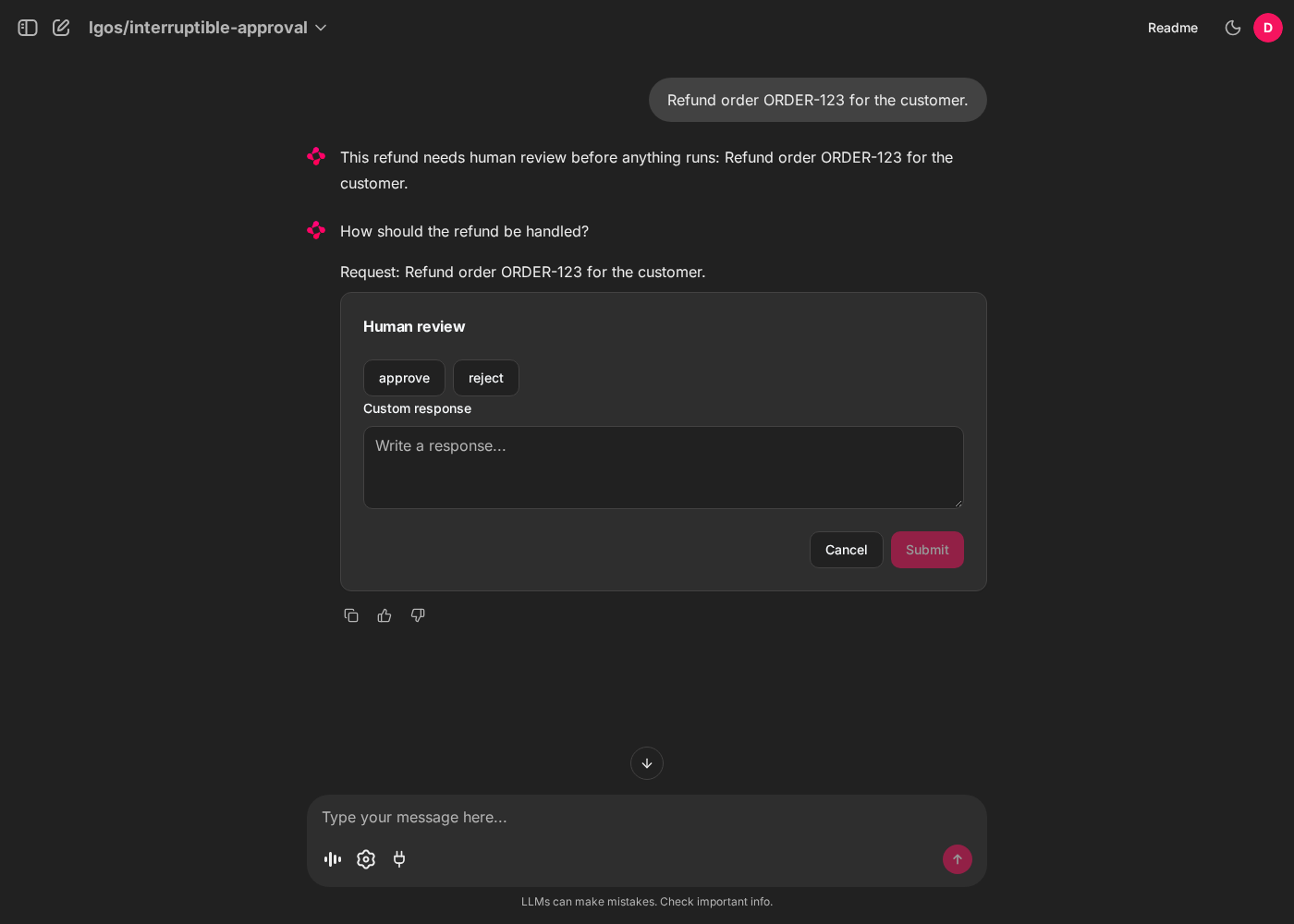
Chainlit renders the LangGraph interrupt as native choices with an optional custom response field.
Navigation recovery and its boundary
The adapter stores the paused Response ID and exact function-call batch on the same model-context-excluded Chainlit message that owns the custom review element. Chainlit's native thread hydration restores both records when the user returns to the thread; there is no live ask prompt to recreate and no socket-owned task waiting for input. Switching threads, refreshing, or reconnecting therefore neither duplicates the persisted message nor rejects or resumes the graph. Chainlit queues data-layer writes asynchronously, with no public flush API, so a process crash can still occur before that message reaches PostgreSQL.
A submission records the answers before the resume request, so the persisted revision and the answered ledger reject stale or duplicate submissions. If the resume fails, is stopped, or the worker is lost, the review stays answered and the next message continues from the conversation. The demo does not durably cache a terminal response or a later interrupt response that has not yet reached Chainlit; neither can be reconstructed from the answered ledger. Applications requiring recovery across that window need a durable result/pending-response handoff in their UI boundary. See Interruptible Human Review for server-side checkpoint retention.
Streaming, Events, And Citations
The bundled Chainlit client uses OpenAI Responses. In streaming mode, the SDK
stream manager owns event accumulation and supplies
the terminal Response; the adapter streams
answer text into the assistant message. Messages without the optional phase
field are also treated as answers. It maps completed phase="commentary"
items to the display selected by DEMO_CHAINLIT_STATUS_DISPLAY:
| Value | Display |
|---|---|
steps |
One native Chainlit step per turn. Its label updates with the latest status; click it to expand the history. This is the default. |
tasklist |
A native TaskList containing each status. |
The step stays collapsed by default and keeps its history in the expanded
content. The task list completes the previous task when the next status arrives.
Both displays finish when the turn succeeds or pauses for human review. Clicking
Stop, a failed request, or an incomplete response marks the active status
as failed. Statuses stay out of the assistant answer and later model context.
Background response polling uses the same display setting. Restart Chainlit
after changing it. The bundled [UI] cot = "tool_call" configuration makes
steps visible; custom configurations must use "tool_call" or "full".
Clicking Stop also closes the Responses stream. The answer text shown so far stays visible and in later model context; Chainlit's "Task manually stopped." notice does not. Both streaming and non-streaming requests require a completed Response before displaying files or accepting a successful turn. Failed interrupt resumes leave the saved continuation intact.
Native refusal text is displayed as the assistant's explanation. Incomplete responses report their native reason, retain any already streamed text for the user, and do not execute client functions. Failure and incomplete events are handled directly because the SDK's final-response helper requires completion.
Transcript replay labels assistant answers as final_answer and preserves
explicit phase values, following OpenAI's
assistant phase guidance.
The persistent plot graph returns a standard display_file function call.
Chainlit downloads the Plotly JSON through the OpenAI Files API, reconstructs
the figure with plotly.io.from_json, and persists a native
Plotly element with
interactive hover, zoom, and legend controls. It returns the matching
function_call_output before requesting the final answer. Image files still
use the native Image element.
Each continuation of a new turn retains the original input, including
instructions and file references, then appends the complete Response output and
matching tool results.
Streaming and non-streaming modes retain final-answer text from every call in
that exchange and exclude commentary from the answer.
The official data layer stores the element in the configured S3-compatible
bucket, so it returns with the thread.
The UI renders Markdown links, images, and inline citation markers from assistant content. Shared prompts and graph behavior are documented under Events And Citations and Persistent Plot Agent. A schema-normalizing proxy must preserve standard Responses items and events.
Settings Reference
Use .env.example
for demo environment values. The tables below explain their roles, not their defaults.
Shared gateway settings are documented in Stack Settings. Chainlit-specific settings:
| Setting | Notes |
|---|---|
DEMO_CHAINLIT_STATUS_DISPLAY |
Status presentation: steps or tasklist; also applies to background polling. |
DEMO_CHAINLIT_LOGIN_TYPE |
Browser login: mock (default) or oauth. The SSO overlay sets oauth. |
DEMO_CHAINLIT_ENABLE_OAUTH_TOKEN_FORWARDING |
false (default) uses the static key. true requires OAuth login and forwards each user's access token; the SSO overlay sets it. |
DEMO_CHAINLIT_OAUTH_RESOURCE |
Optional RFC 8707 resource identifier passed in OAuth authorization and token requests. |
DEMO_CHAINLIT_OAUTH_ISSUER |
Required for oauth. Exact HTTPS issuer; endpoints and signing keys come from discovery. The SSO overlay sets it from DEMO_SSO_ISSUER. |
DEMO_CHAINLIT_OAUTH_CLIENT_AUTH_METHOD |
client_secret_basic (default) or client_secret_post; used for code exchange and delegated refresh/revocation. |
DEMO_CHAINLIT_OAUTH_ENCRYPTION_KEYS |
Required only for OAuth token forwarding. JSON list of Fernet keys, primary encryption key first. |
CHAINLIT_UTILS_MIGRATIONS_TABLE |
Chainlit-utils schema migration ledger. |
CHAINLIT_UTILS_MODEL_CONTEXT_EXCLUDED_KEY |
Persisted metadata key for UI-only messages. |
See the bundled Bifrost gateway for the Compose endpoint and adapter behavior.
Unprefixed Chainlit and OIDC integration settings:
| Setting | Notes |
|---|---|
DATABASE_URL |
Required. PostgreSQL data-layer URL. |
CHAINLIT_AUTH_SECRET |
Required. Browser-session and temporary OAuth-state signing secret. |
CHAINLIT_APP_ROOT |
Tracked UI configuration and welcome Markdown. |
BUCKET_NAME |
Required. S3-compatible bucket for native elements. |
APP_AWS_ACCESS_KEY |
Required. S3 access key. |
APP_AWS_SECRET_KEY |
Required. S3 secret key. |
APP_AWS_REGION |
Required. S3 signing region. |
DEV_AWS_ENDPOINT |
Required. Custom S3-compatible endpoint URL. |
STORAGE_EXPIRY_TIME |
Lifetime in seconds for resumed element URLs. |
CHAINLIT_URL |
Required for oauth. External HTTPS origin for callbacks. |
OAUTH_GENERIC_CLIENT_ID |
Required for oauth. OAuth client ID. |
OAUTH_GENERIC_CLIENT_SECRET |
Required for oauth. OAuth client secret. |
OAUTH_GENERIC_SCOPES |
Required for oauth. Space-separated scopes. |
OAUTH_GENERIC_NAME |
Provider ID used in the callback path. |
OAUTH_PROMPT |
Optional prompt parameter for every Chainlit OAuth provider. |
OAUTH_GENERIC_PROMPT |
Optional prompt override for the configured generic provider. |
The element bucket must allow browser CORS GET and HEAD requests from the
Chainlit origin. CORS only permits the cross-origin response; the object still
requires Chainlit's time-limited presigned URL. See
Amazon S3's CORS guide.
Review Chainlit's current MCP and PostgreSQL guidance when updating Chainlit because those native contracts are release-specific.
Production Notes
- Use OAuth login in production, as
just demo/compose --ssodoes; mock login provides no access control or user isolation. - Choose static-key or delegated gateway authorization explicitly with
DEMO_CHAINLIT_ENABLE_OAUTH_TOKEN_FORWARDINGwhen Chainlit runs outside the demo Compose stack. - The gateway MCP connection uses the same credential as Responses and Files: the static key, or each user's delegated token.
- Keep OAuth, signing, and object-storage secrets outside source control.
- Restrict
allow_originsto the deployed HTTPS origin. - Configure session affinity for multiple UI workers and object storage for native file and chart persistence. File-capable profiles enable attachments.
- Route traffic to a new worker only after its health check passes; the endpoint answers once startup migrations finish.
See Chainlit's documentation for password callbacks, OAuth, PostgreSQL persistence, and deployment.